hiWelcome to The Carpentries Etherpad!
This pad is synchronized as you type, so that everyone viewing this page sees the same text. This allows you to collaborate seamlessly on documents.
Use of this service is restricted to members of The Carpentries community; this is not for general purpose use (for that, try https://etherpad.wikimedia.org).
Users are expected to follow our code of conduct: https://docs.carpentries.org/topic_folders/policies/code-of-conduct.html
All content is publicly available under the Creative Commons Attribution License: https://creativecommons.org/licenses/by/4.0/
----------------------------------------------------------------------------
2022 Autumn quarterly Data Carpentry workshop
Day One: GitHub without the Command Line
Please sign in with your Name, Smithsonian Unit, and your favorite emoji (https://emojipedia.org/)
- Sylvain Korzennik, SAO 👽
- Mike Trizna, OCIO, 🏕️
- Adela Roa-Varon IZ/VZ 😎
- Richard Naples SLA 😬
- Ryan Evans AAA 🥸
- Kathy Papienski, OA, 🐱🏍
- Julia Steier, SIBN :3
- Marie Terrell, SAO 🦥
- Jen, NMNH :D
- Talitta Simoes NMNH 👻
- Sara Goodhand, OCIO/DPO 🥳
- Paula Castiblanco, CEC 💩
- Kristen Whyle, CEC 😊
- Tripp Macdonald LAB
- Guilherme Corte, SERC 😴
- Shelly Uhlir, NMAI ✨
- Alan Hejnal, OA
- Allie Anderson, SMBC 🦔
- Niamh Redmond, SIBN
- Michael O'Mahoney, NMNH 🙃
- Bibi Powers-McCormack, SERC 🦦
- Terah, NMAAHC 🫧
- Whitman Miller, SERC, Black Hole
- Camilo Gomez, Stri/UQAT
Basics and Motivation
https://miketrizna.github.io/github-without-command-line/basics.html
Questions
- What is version control and why?
- What are commits and branches?
- What are forks and clones?
Objectives
- Get a mental representation for commits and branches.
- Understand the difference between forks and clones.
- Understand the difference between Git and GitHub.
git = version control
Github = a host for git repositories
Example: https://github.com/achael/eht-imaging
achael - user
eht-imaging - repository
Generally, do people start a repository from the very beginning of their projects (like when the software isn't yet working properly) or do they generally wait until they have a working project/software?
Creating Repos using the Web Interface
https://miketrizna.github.io/github-without-command-line/creating-using-web.html
GitHub license info: https://docs.github.com/en/repositories/managing-your-repositorys-settings-and-features/customizing-your-repository/licensing-a-repository
Learner Questions
- If you don't add a license when it's first set up, can you add one later?
- Open your LICENSE file and edit it. In the editor window you will see the Choose a license template button at the top right corner of your screen
- Can you create the repository as a private and then changed it to public?
- Yes, if you enter the settings page of the project (the little gear icon) it will appear at the bottom of the page in the Danger Zone section. It will be the option to change project visibility
- I think SI has certain licensing rules for software created by us. Do you know who we would contact regarding this?
- Ask OGC for guidance
- Can you alter commit titles or descriptions?
- Not easily
- Can you merge a branch back into the main document?
- https://docs.github.com/en/desktop/contributing-and-collaborating-using-github-desktop/keeping-your-local-repository-in-sync-with-github/syncing-your-branch
- It is scary when thinking about api keys, tokens, passwords, etc. I would like to know how to deal with these types of things when using Github
- It would be best practice (afaik), to place the API keys in a seperate file and then add the name of the file to your .gitignore file. In this way, GitHub should keep these files from being published or tracked (https://git-scm.com/docs/gitignore)
.md = markdown file
Ingredients:
- 2 avocados
- 1 lime
- 2 tsp salt
Instructions:
- cut and mash avocados
- chop onion
- squeeze lime
- add salt
- and mix well
GitFlow is a style of using lots of branches, while trunk-based development is for the other way (Mike will add links to explain)
MarkDown: https://codimd.carpentries.org/new
Guac Pics: https://commons.wikimedia.org/w/index.php?search=guacamole&title=Special:MediaSearch&go=Go&type=image&haslicense=unrestricted
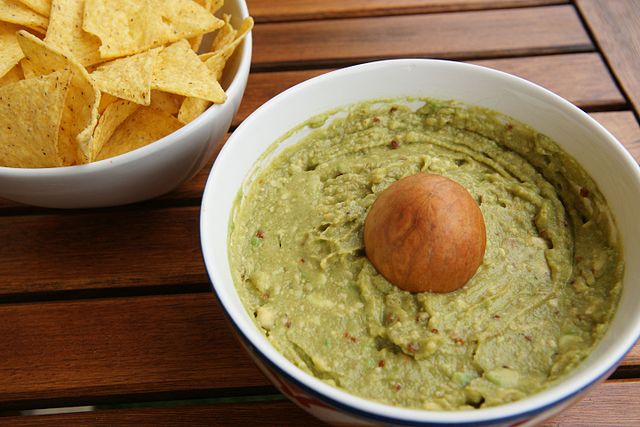
Exercise 1
Use as many of the Markdown skills you just learned to edit either the README.md or guacamole.md files.
GitHub Issues and Pull Requests
https://miketrizna.github.io/github-without-command-line/contributing.html
Add in your name, and a link to your repository
Mike Trizna - https://github.com/MikeTrizna/recipes
Niamh - https://github.com/redmondn/recipes
Sara Goodhand - https://github.com/GoodhandSA/recipes/issues
Sylvain Korzennik - https://github.com/skorzennik/recipe
Richard Naples https://github.com/drastician/recipes
Julia - https://github.com/steierj/Recipes
Ryan Evans - https://github.com/evansr2/recipes
Kathy Papienski - https://github.com/papienskik/recipes/issues
tripp - https://github.com/trippster08/recipes
Adela- https://github.com/aroavaron/pop-gen
Kristen Whyle- https://github.com/WhyleK/recipes/issues/1
Paula Castiblanco - https://github.com/PaulaJCCamacho/recipes
Marie - https://github.com/Marie-Terrell/recipes
Talitta - https://github.com/TalittaSimoes/recipe
Shelly https://github.com/uhlirs/recipes.git
Alan: https://github.com/BrokenNote443/recipes
Making Changes with GitHub Desktop
https://miketrizna.github.io/github-without-command-line/gh-desktop-changes.html
https://smithsonianworkshops.github.io/2022-autumn-smithsonian/files/avocado_recipes.zip
Creating a Repo with GitHub Desktop
https://miketrizna.github.io/github-without-command-line/gh-desktop-create.html
+
Hosting Websites on GitHub Pages
https://miketrizna.github.io/github-without-command-line/websites.html
+
+
+
SI Specifics
https://miketrizna.github.io/github-without-command-line/smithsonian.html
+
+
+
+
+
Day 2: Data Cleaning with OpenRefine
Please sign in with your Name, Smithsonian Unit, and your favorite object in the Smithsonian collections:
- Jen (NMNH, helper), Gloves woven from the hairs of a mollusk shell (ask for a tour of the IZ dry collection)
- Kayleigh Walters, Gardens, can't pick!
- Heidi Stover, SIA, Historic photos
- Sara Goodhand, OCIO/DPO, Never thought about it!
- Amanda Reynolds, SERC, not sure--but can't wait to see the reopened Air and Space!
- Hannah Stubee, NMNH, 1.8 by Janet Echelman (the rainbow net) at the Renwick
- Whitman Miller, SERC, African Elephant
- Megan Viera, NMNH, photos of historic taxidermy workshops
- Michael O'Mahoney, NMNH (helper), The "shrunken head" collection <==== Eeeek! Tis the season!
- Talitta Simoes, NMNH, Hope diamond
- Kathy Papienski, OA, the gold wall in NMAfA made of bottle caps
- Alan Hejnal, OA, some of the birds at SCBI. Or the Przewalski's horses at NZP
- Marie Terrell, SAO, everything in air and space
- Bibi Powers-McCormack, SERC, can't decide!
- Joanne Choi, OA, it's hard to pick one!
- Terah, NMAAHC,
Intro
Key Points
- OpenRefine is a powerful, free and open source tool that can be used for data cleaning.
- OpenRefine will automatically track any steps you take in working with your data.
Working with OpenRefine
Key Points
- Faceting and clustering approaches can identify errors or outliers in data.
Learner Questions
- Where is this project stored, then?
- OpenRefine stores your project files in the workspace directory. How to navigate to these files is described here: https://docs.openrefine.org/manual/installing#set-where-data-is-stored
- Are there any characters that will break this program? For instance, we use the multiplication symbol a lot, and that breaks R.
- It shouldn't be an issue once the data is loaded into the project. It can become an issue when editing cells if you plan to manipulate data using regular expressions
- How do you undo a transformation?
- Undo/Redo tab on the left side menu of OpenRefine
- So, definitions of Keying Function are in documentation?
- https://docs.openrefine.org/technical-reference/clustering-in-depth
- Is there a way to exclude one of the cluster options so it doesn't always appear?
- There doesn't appear to be a way to exclude single values from cluster results
- What are regular expressions?
- A regular expression is a sequence of characters that specifies a search pattern in text. They are useful in isolating data that is similar but not exactly the same. SI workshop on the topic: https://github.com/SmithsonianWorkshops/HydraResources/blob/master/Regular_Expressions.md
What issues do you see in the ScientificName facet?
- Mispellings of genus and species names +1+1+1+1+1+1+1+1+1+1
- blank entries+1+1+1+1+1+1+1+1
- Genus and species could have changed over time with new research, leading to outdated names (could not tell you that any of these are incorrect for sure in this data set, but it could happen in general)+1+1
- The diamond question mark.+1+1+1+1+1+1+1
- a few apparent typos in names (or else *very* similar names genus and species names?)
- The file is named rodents, but some of these species are not rodents!+1+1
- A few of the entries are not rodents
- abbreviation ("sp.")
Exercise
- Using faceting, find out how many years are represented in the census.
26+1+1+1+1+1+1
- Which years have the most and least observations?
- 1997 most, 2493 +1+1+1+1+1+1+1+1+1
- 1977 least, 503 +1+1+1+1+1+1+1+1
-
-
- 1997 most, 1977 least
3. Is the column formatted as Number, Date, or Text? How does changing the format change the faceting display?
- Text+1+1+1+1+1+1
- looks like it's text. faceting it as timeline is therefore unrevealing! +1
- Text
- Can't get usable data in format other than text.+1
-
- Timeline seems to require specific date/time format
Exercise
Try to change the name of the second new column to “species”. How can you correct the problem you encounter?
Capitalize the name+1
Rename the original 'species' column to something more appropriate, like species code, etc+1+1+1+1+1+1
I renamed to species_name b/c I would worry about the two column issue
Exercise
- How would you restrict this to one of the species selected?
for the first, regular expression ^Bai and for the second the same but a space rather than a caret and lower case b+1+1
You click the one you want in the scientificName facet (you can do this with include/exclude multiple times to include one or two out of the list of options)+1+1+1
check case sensitive+1+1+1+1+1+1+1
Filtering and Sorting with OpenRefine
Key Points
- OpenRefine provides a way to sort and filter data without affecting the raw data.
Examining Numbers in OpenRefine
Key Points
- OpenRefine also provides ways to get overviews of numerical data.
Scripts from OpenRefine
Key Points
- All changes are being tracked in OpenRefine, and this information can be used for scripts for future analyses or reproducing an analysis.
- Scripts can (and should) be published together with the dataset as part of the digital appendix of the research output.
Exporting and Saving Data from OpenRefine
Key Points
- Cleaned data or entire projects can be exported from OpenRefine.
- Projects can be shared with collaborators, enabling them to see, reproduce and check all data cleaning steps you performed.
Other Resources in OpenRefine
Key Points
- Other examples and resources online are good for learning more about OpenRefine
Day 3: Intro to R
Please sign in with your name, SI unit, and your favorite halloween costume:
- Richie Hodel, NMNH/OCIO, dragon costume
- Mike Trizna, OCIO, Bob Ross 🎨🏔
- Amanda Reynolds, SERC, My son was humpty dumpty; I was the wall
- Talitta Simoes, NMNH, Pink Freud (Sigmund Freud in a pink suit)
- Matthew Kweskin, NMNH, The 4th Doctor Who🧣
- Ryan Evans, AAA, Peewee Herman
- Sara Goodhand, OCIO/DPO, baby Harry Potter
- Jen Hammock, NMNH, T- Rex!
- Silvia Justi - Entomology/MSC - The Phantom of the Opera- I am custom sewing it for her! (my oldest this halloween)
- Lindsey Gentry, NZP, Ring tailed lemur
- Adela VZ/IZ (NMNH) El dia de los muertos face painting!
- Kayleigh Walters, Gardens, "haunted" - person with helium ghost balloons tied to themselves
- Joanne Choi, OA, anything Harry Potter related!
- Elizabeth Beesley, NASM, my kid wants to be an astronaut queen for Halloween
- Alan Hejnal, OA, The Red Baron
- Kathy Papienski, OA, friend was dressed up as a castle with a working moat
- Marie Terrell, SAO, Bluey
- Terah, NMAAHC, anything Hellboy
- Michelle Uejio, OIG, National Park Ranger
- Richard Naples, SLA, Existential Dread
- Kassi Dami - NZCBI - characters from LotR, Harry Potter, video games, etc.
- Christine France MCI - Trelawny from Harry Potter
- Whitman Miller, SERC - Black Hole
- Camilo Gomez, Stri/UQAT
https://smithsonianworkshops.github.io/2022-autumn-smithsonian/
If you ran into issues with RStudio installation, here is a browser-based version that should get you up and running:
Learning Objectives
Define the following terms as they relate to R: object, assign, call, function, arguments, options.
Create objects and assign values to them in R.
Learn how to name objects.
Save a script file for later use.
Use comments to inform script.
Solve simple arithmetic operations in R.
Call functions and use arguments to change their default options.
Inspect the content of vectors and manipulate their content.
Subset and extract values from vectors.
Analyze vectors with missing data.
Challenge 1:
Challenge# 122
What are the values after each statement in the following?
mass <- 47.5 # mass? +1+1+1+1+1+1+1+1+1
age <- 122 # age?+1+1+1+1+1+1+1+1
mass <- mass * 2.0 # mass? 95 +1++11+!+1+1+1+1+1
age <- age - 20 # age? 102+1+1+!++11+1+1+1+1
mass_index <- mass/age # mass_index 0.93+1+1+1++1+1+1+1+1
Return at 2:15 EDT
Challenge
What will happen in each of these examples? (hint: use class() to check the data type of your objects):
num_char <- c(1, 2, 3, "a") errors outif you (accidentally) have more than 1 character in the quotes all treated as character looks like it treats everything as a character(+1)
num_logical <- c(1, 2, 3, TRUE) all treated as numeric true = 1 and presumably false = 0, all are numbers (+1)
char_logical <- c("a", "b", "c", TRUE) all treated as character it classes the last thing is a character and not a logical
tricky <- c(1, 2, 3, "4") all treated as character 4 in quotes is not numeric looks like all get classed as character because one of them is a character thanks to the quotes
Why do you think it happens?
seems to resolve vectors with ambiguousl data types as character over numeric or logical, numeric over logical
if character in vector seems to think of them as strings, if logical = number+1
Challenge
Can you explain why "four" > "five" returns TRUE? alphabet +1+1+1+1+1 (ascii?)
Because O comes after I in the alphabet? Does it index the two things compared and sort them and then it's actually the position that is greater? Haha I like to ascribe magical abilities to things...
"good" > "bad" == TRUE, lol.
"me" > "you" == FALSE (uh oh...)
Come back at 3:17 EDT
https://ndownloader.figshare.com/files/2292169
Day 3
Tidyverse and ggplot
Lesson: https://datacarpentry.org/R-ecology-lesson/03-dplyr.html
Please sign in with your name, SI unit, and vote for your favorite season:
Winter
Spring
- Richard Naples, SLA
- Marie Terrell, SAO
- Silvia Justi - Spring
Summer
- Mike Trizna, OCIO
- Matt Kweskin, NMNH
Fall
- Alan Hejnal, OA
- Joanne Choi, OA
- Kayleigh Walters, SG
- Christine France, MCI
- Sara Goodhand, OCIO/DPO (prefer actual fall)
- Kassi Dami, NZCBI
- Talitta Simoes, NMNH
- Terah, NMAAHC
- Michelle Uejio, OIG
- Lindsey Gentry, NZP
Other
- Kathy Papienski, OA (I like all seasons!)
- Amanda Reynolds, SERC, Winter when there is snow (grew up in the north so there was things to do in winter!), Summer but not August, Love spring and fall.
To select only the columns with numeric values, use one of the following statements:
- surveys %>% select(where(is.numeric))
- surveys %>% select_if(is.numeric)
- select_if(.tbl = surveys, is.numeric)
Giving your View() selection a title
surveys %>%
filter(weight > 50 & species_id == "NL") %>%
View(title = "Bob")
CHALLENGE:
Using pipes, subset the surveys data to include animals collected before 1995 and retain only the columns year, sex, and weight.
view(
surveys %>%
filter(year < 1995) %>%
select(year, sex, weight)
)+1
surveys_challenge <- surveys %>%
filter (year < 1995) %>%
select (year, sex, weight)
surveys %>%
filter(year < 1995) %>%
select(year, sex, weight) %>%
View() whoops! flipped it--corrected
< 1995?
survey %>%
filter(year < 1995) %>%
select(year, sex, weight) %>%
View(title = "Challenge"). <==== fancy!+1 before running into errors. I tried too!
surveys %>%
filter(year < 1995) %>%
select(year, sex, weight) %>%
View()
surveys %>%
filter(year < 1995) %>%
select(year, sex, weight) %>%
View()
select(filter(surveys, year < 1995), year, sex, weight) %>%
view(title = "pre-1995")
surveys %>%
filter(year < 1995) %>%
select(year, sex, weight) %>%
View()
Challenge with mutate():
Create a new data frame from the surveys data that meets the following criteria: contains only the species_id column and a new column called hindfoot_cm containing the hindfoot_length values (currently in mm) converted to centimeters. In this hindfoot_cm column, there are no NAs and all values are less than 3.
mm to cm, divide by 10
Hint: think about how the commands should be ordered to produce this data frame!
foot_challenge<-surveys %>%
mutate(hindfoot_cm = hindfoot_length/10) %>%
select(species_id, hindfoot_cm)
surveys_hindfoot <- surveys %>%
mutate(hindfoot_cm = hindfoot_length / 10) %>%
filter(!is.na(hindfoot_cm) & hindfoot_cm < 3) %>%
select(species_id, hindfoot_cm)+1+1
surveys_mutatechallenge <- surveys %>%
mutate(hindfoot_cm = hindfoot_length / 10) %>%
filter (!is.na(hindfoot_cm)) %>%
filter (hindfoot_cm < 3) %>%
select (species_id, hindfoot_cm)
surveys_challenge <- surveys %>%
mutate(hindfoot_cm = hindfoot_length / 10) %>%
filter(hindfoot_cm < 3) %>%
select(species_id,hindfoot_cm)
species_hindfoot <- surveys %>%
mutate(hindfoot_cm = hindfoot_length / 10) %>%
filter(!is.na(hindfoot_cm) & hindfoot_cm < 3) %>%
select(species_id, hindfoot_cm)
view(species)
challenge_surveys <- surveys %>%
mutate(hindfoot_cm = hindfoot_length / 10) %>%
filter(!is.na(hindfoot_cm) & hindfoot_cm < 3) %>%
select(species_id, hindfoot_cm) %>%
view()
challenge_2 <- survey %>%
mutate(hindfoot_length_cm = hindfoot_length / 10) %>%
filter(!is.na(hindfoot_length_cm)) %>%
filter(hindfoot_length_cm < 3) %>%
select(species_id, hindfoot_length_cm) %>%
View(title = "Challenge 2")
GGPlot2 Lesson
https://datacarpentry.org/R-ecology-lesson/04-visualization-ggplot2.html
Video explanation of ggplot: https://www.youtube.com/watch?v=h29g21z0a68
Dataset for lesson:
ggsave currently recognises the extensions eps/ps, tex (pictex), pdf, jpeg, tiff, png, bmp, svg and wmf (windows only).
- ggsave natively supports all the above extensions except for svg. In order to save a file as an svg, you will need to install and load the svglite package.
Challenge
Use what you just learned to create a scatter plot of weight over species_id with the plot types showing in different colors. Is this a good way to show this type of data?
surveys_complete %>%
ggplot(mapping = aes(x = species_id, y = weight)) +
geom_point(aes(color = species_id)) -Probably not the most uselful - doesn't tell you about sexual variation. Does show a range, and potential outliers. Don't really need color, since that's there in the species info. Oops!
surveys_complete %>%
ggplot(mapping=aes(x=species_id,y=weight)) +
geom_point(alpha = 0.1, aes(color = species_id))
(Mine lookes almost like a bar chart)
surveys_complete %>%
ggplot(mapping = aes(x = species_id, y = weight)) +
geom_point(alpha = 0.1, aes(color = plot_id))
Well, you're coding the same information two different ways, on the x axis and in the color
surveys_complete %>%
ggplot(mapping = aes(x = species_id, y = weight)) +
geom_point(aes(color = plot_type)) +1
FEEDBACK FORM: https://forms.gle/xYrXig8bLG91mmB59
Outro Slides: https://miketrizna.github.io/outro_quarto/carpentries_outro.html#/title-slide